TL;DR / Evidence before a score
What should an AI visibility audit give you?
Keep the evidence, choose a useful priority and give the next step an owner.
- Doing this yourself? Choose one service and a small set of customer questions.
- Coordinating a team? Save the answers, sources and dates in one shared record.
- Buying an audit? Ask for findings you can inspect and fixes someone can deliver.
Separate a brand mention from a citation. If an answer names your business but links to a directory, record the mention and the directory URL. That is not evidence of a visit to your website or a qualified inquiry.
Article link: https://stillmatter.marketing/blog/ai-visibility-audit/
Check a real business question, not a score in isolation.
An AI visibility audit reviews how answers describe your business and what supports those descriptions.
The useful output is a record of findings and actions. A score alone cannot tell you what needs fixing.
This checklist is a starting review for a small business or internal marketing team.
It covers a chosen question sample and relevant website pages, not every answer or technical issue.
For the overview, read our AI visibility guide. This post takes you through the checking process.
Choose the service, customer need and location you want to review. Write down what is outside scope.
Use public business facts.
Keep customer records, passwords and private account details out of AI prompts.
Agree what a correct answer would need to say.
Start with the business as it operates today. An audit needs something reliable to compare answers with.
Ask the person responsible for the service to confirm the important details.
- Current name, services and contact route.
- Customers and areas served.
- Hours, availability and service limits.
- Evidence for claims, qualifications and relevant experience.
Keep the page or record that supports each fact. Note anything that still needs confirmation.
If your own team disagrees about the offer, resolve that before grading an AI answer.

Read diagram text
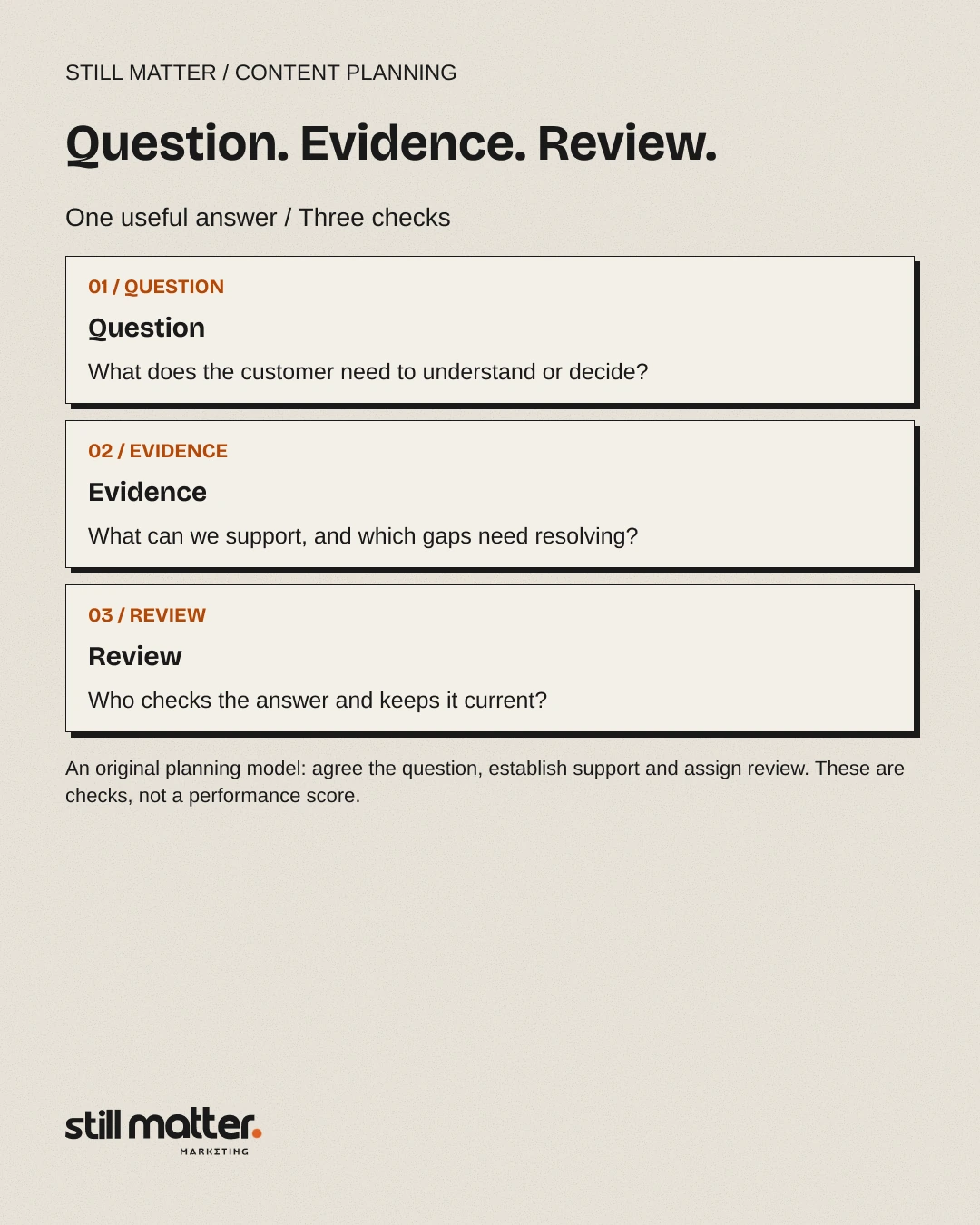
Question. Evidence. Review.
Still Matter / Content planning
One useful answer / Three checks
- 01 / Question
- What does the customer need to understand or decide?
- 02 / Evidence
- What can we support, and which gaps need resolving?
- 03 / Review
- Who checks the answer and keeps it current?
An original planning model: agree the question, establish support and assign review.
These are checks, not a performance score.
Include discovery, comparison and a direct business check.
Use language from real inquiries and sales conversations.
Keep the sample small enough to repeat.
Include questions where the customer has not already named your business.
- Discovery: who can help with this problem in this area?
- Comparison: which service fits this need and constraint?
- Direct check: what does this named business offer?
These are question patterns, not measured customer quotes. Replace them with relevant wording.
A named-business question checks a description. It does not show that a new customer would discover you.
Save the exact wording before you begin. Changing it each time makes comparisons harder to interpret.
Choose relevant tools and search modes. Record the version or mode when it is shown.
Label questions that name the business.
A branded query names the business or a recognizable brand-specific offering. A non-branded query does not name the brand you are measuring. In a fictional example, “Cedar Heating maintenance plans” checks Cedar directly; “who offers planned boiler maintenance nearby?” asks for options.
Keep those groups separate in your audit record. Naming Cedar in the question and seeing Cedar in the answer does not establish that it would appear in an open search. Neither group proves whether the person is a new customer. Automated reporting classifications can make mistakes; check sample queries and record the grouping method. Google’s branded-query guidance describes its own classification and limits.
Keep the answer and its context together.
Ask the questions and save what you actually receive. Keep an answer copy or screenshot with your notes.
Record the date, tool and search mode. Note any location setting and whether web search was used.
Start each independent question in a fresh conversation where the tool allows it.
If you use follow-up questions, save that conversation too. Earlier messages can change the context.
Google says its AI features can show different answers and links.
A single result is an observation, not a reliable measure of your overall market presence.
See Google's AI features guidance for its explanation and limits.
When comparing repeated checks, retain the wording and record changes in settings or context.
Do not combine unlike tools or question sets into a percentage that looks more certain than it is.
Keep a reporting query separate from the customer’s words.
A grounding query is a system search for supporting information. Do not record it as a customer quotation. Keep the original question when you have it, and label a reported query separately.
In Bing’s AI Performance reporting, citation share is your site’s share of citations for a particular grounding query across the covered experiences. It is not a percentage of visits or sales. Record the platform, query and period before comparing values. See Bing’s reporting definitions.
AI referral traffic counts visits your analytics can attribute to an AI source. A mention without a click creates no visit; a visit without identifiable referral or campaign data may not appear in that group. Keep missing attribution visible instead of treating it as proof that nobody arrived through AI.
Look for the source behind an important claim.
Check whether the answer names your business, describes it accurately and links to supporting sources.
Open those sources. Compare the relevant statement with your confirmed business facts.
- Supported: the source matches the current facts.
- Wrong or outdated: the statement conflicts with confirmed information.
- Unclear: the available evidence does not settle the point.
- Not seen: your business was absent from this particular answer.
Keep “not seen” separate from “wrong.” A missing mention does not prove that your website is broken.
If no supporting source is shown, record that limit. Do not invent where the answer came from.
A source link is a lead to check, not proof that every sentence in the answer came from that page.
Have a specific finding? Use the decision tree and correction brief to route the work to the right person.
Read the relevant page and try the next step.
Can a new customer understand the offer from the service page? Check the details against your facts.
Look for old names, expired claims, missing limits and vague descriptions.
Then try the contact or booking route on a phone. A useful answer still needs a working next step.
Ask your website team to check access for the search tools in scope.
For Google, a supporting page must be indexed and eligible for a search snippet.
Eligibility does not guarantee inclusion. Google's AI guidance explains this requirement.
Keep index status and a live test separate
Ask someone with Search Console access to check the page.
Google's URL Inspection tool reports information about its indexed version of a page.
That is the version Google has recorded for search, which may differ from the current page.
Its live test checks whether the current page might be indexable. A passing test is not proof of indexing.
Ask the team to save which result they checked, not just “Google check passed.”
Use the current URL Inspection documentation when interpreting the result.
OpenAI documents separate search and training controls in its crawler guidance.
Have the relevant settings reviewed before changing them. Do not treat every AI crawler as the same.
Google Search Central's January 2020 introduction. Screens and features may differ today.
Watch on YouTube. Use the current help page above for today's instructions.
Check the preview without promising its wording.
A search snippet previews a page. Google may use page content or a meta description, and the text can vary by query. If a preview shows an old service claim, check the current page and its description first. Give the editor the inaccurate wording and the confirmed replacement; then recheck the published page separately from the search result. See Google’s snippet guidance. A corrected description does not guarantee a particular preview or inclusion in an AI answer.
Keep a record someone else can follow.
Use one entry per finding. Keep the answer copy alongside it so another person can check your conclusion.
Copy these fields into a shared document, or download the plain-text audit record.
- Question and scope
- Exact question; service, customer need and location.
- Check context
- Date; tool and mode; web search setting; conversation context.
- Observed answer
- Answer copy; business mention; linked sources; important statement.
- Evidence and status
- Confirmed fact; supporting record; supported, wrong, unclear or not seen.
- Next step
- Action; responsible person; agreed review date; result after checking.
The record is open to use. You do not need to submit an email address or buy software.
Mark unavailable information as unknown. An empty field is more honest than a guessed explanation.
Turn a specific error into a specific task.
Imagine a local IT support firm. This is a fictional example, not an audit result or client story.
A direct question asks whether the firm offers support all night.
The saved answer says yes and links to an old directory listing.
The owner confirms that support runs on weekdays only. The website states those hours correctly.
- Finding: the answer describes availability the business does not offer.
- Evidence: the saved answer, old listing and confirmed service hours.
- Action: the owner requests a correction from the directory.
- Review: check the listing and repeat the recorded question on the agreed date.
The listing might be corrected before the AI answer changes. Keep those observations separate.
Do not call the issue resolved just because you sent the correction request.
This finding also does not show that the firm is widely recommended or gaining useful inquiries.
Choose actions by customer impact and evidence.
Separate work you can verify from outcomes controlled by an AI service.
- Repair: correct false service details or a broken customer route.
- Clarify: explain an offer or limit that readers cannot understand.
- Investigate: ask a specialist to check an unresolved access issue.
- Observe: keep uncertain or missing mentions in the record before making changes.
These are Still Matter's working categories, not a universal scoring system.
Give each agreed action an owner and a review date. Test the changed page or route after delivery.
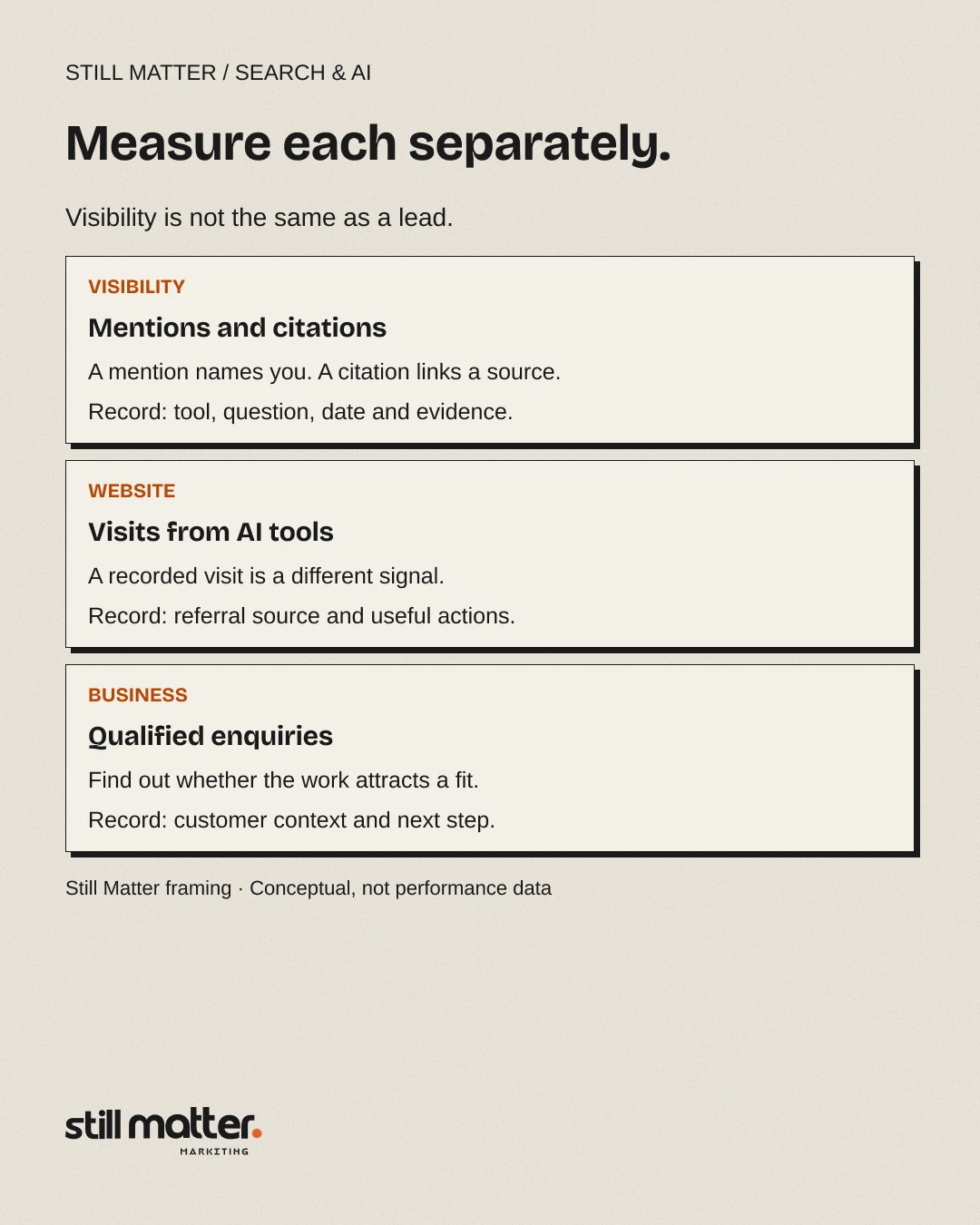
Keep mentions, visits and useful inquiries in separate records.

Read diagram text
Measure each separately.
Still Matter / Search & AI
Visibility is not the same as a lead.
Visibility
- Mentions and citations
- A mention names you. A citation links a source.
- Record: tool, question, date and evidence.
Website
- Visits from AI tools
- A recorded visit is a different signal.
- Record: referral source and useful actions.
Business
- Qualified enquiries
- Find out whether the work attracts a fit.
- Record: customer context and next step.
Still Matter framing · Conceptual, not performance data
Mobile note: “Still Matter framing, conceptual, not performance data.”
Our content measurement guide explains how to keep missing data and uncertain results visible.
If you need help coordinating the work, explore Content & growth or tell us what needs attention.
Questions before you commission an audit.
What should an AI visibility audit include?
A defined scope, exact questions, saved answers, source checks and a clear account of the limits.
It should also identify useful actions, their owners and how the work will be checked.
Can I do an AI visibility audit myself?
You can start with public business facts and a small question sample.
Bring in specialist help for access problems or evidence you cannot interpret.
Do I need a paid visibility score?
No score is required for this starting checklist. A tool may help with scale or repeated collection.
Check what its score measures, which questions it uses and what it leaves out.
How often should we repeat the audit?
Agree a schedule your team can maintain. Recheck relevant findings after meaningful changes.
Keep dates and conditions in the record. There is no universal review frequency in this checklist.
Does fixing an issue guarantee an AI recommendation?
No. Verify the repair first and record later answers separately.
The AEO/GEO/SEO guide explains why useful work and guaranteed exposure are different claims.
A few terms worth knowing.
- AI visibility
- How a business or its information appears in AI answers and search experiences.
- Citation
- A link or reference to a source. Check what the source actually supports.
- Qualified inquiry
- A relevant request from someone your business can help, with a useful next step.
What this checklist is based on.
Primary sources checked on 21 October 2026. Platform advice applies to the named service.
- Google: AI features and your website — answer variation and eligibility.
- Google: URL Inspection — indexed information, live tests and their limits.
- OpenAI: crawler controls — separate search and training choices.
The checklist, record and priority categories are Still Matter's practical method.
The diagrams are conceptual frameworks. They do not contain measured performance data.
The IT example is fictional. A manual sample is not a complete view of any platform.
Keep the evidence. Choose a useful fix. Make the next check easier for whoever does it.

Written by Jake Tripp
Founder of Still Matter. Brand strategy and hands-on marketing for small and growing businesses.